 mousePDF
Add a watermark to a PDF without uploading
Place text across every page of your PDF, centered or tiled, with adjustable opacity and rotation. Ideal for drafts or confidential documents.
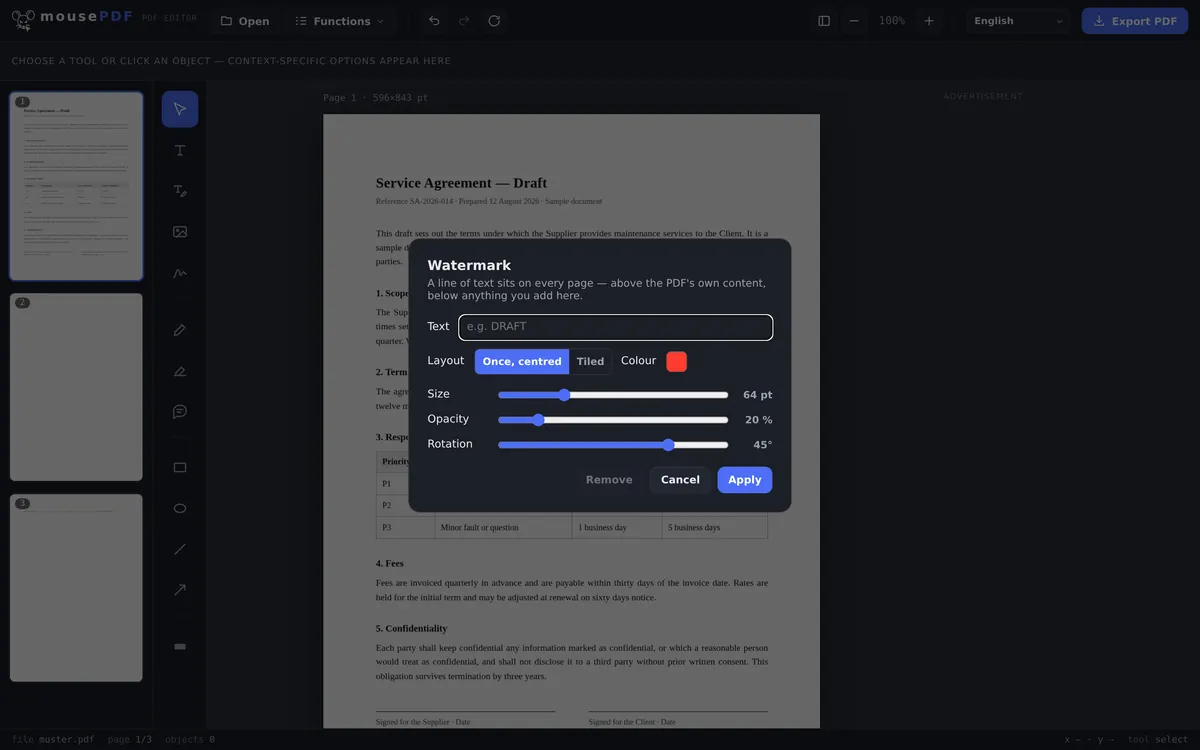
Three simple steps
Open a PDF
Drag a PDF in, or open it through the file dialog.
Set up the watermark
Enter text (e.g. “DRAFT”), choose the layout (centered once, or tiled), and adjust opacity and rotation.
Apply & export
The watermark sits over the content of every page, under anything else you add.
Full control over look and placement
The watermark can be a single, centered line of text or tiled across the whole page. Opacity and rotation are freely adjustable, from a barely visible hint to a bold “CONFIDENTIAL” across every page.
Common scenarios: marking drafts as “DRAFT,” labelling internal documents as “CONFIDENTIAL,” or stamping sample copies with “SAMPLE” before you send them out.
How the watermark gets onto the page
The text is drawn into the page content, not laid on top as a loose note. It sits above the page content carried over from the source, but below anything else you add in the editor. That is the order the preview shows.
You can set the text, size, colour, opacity, rotation and how it is spread across the page. A diagonal, semi-transparent line is the classic choice because it stays readable without making the document unreadable.
The watermark goes on every page of the document, not just the first. For a draft or a sample invoice, that is precisely the point.
How much a watermark really protects
Honestly: a watermark is a label, not protection. It says “draft” or “copy” or “confidential”, and it makes careless forwarding awkward. Anyone determined to remove it can try with the right tools, and that is true of every watermark in every PDF, whatever it was made with.
A watermark is not quite as easy to remove as other things, but with AI or a bit of effort it can be done: the lettering is drawn into the page content rather than attached as a separate, switchable layer. Getting rid of it means editing the page content itself. That deters casual attempts, but not a determined person or an AI.
If the point is to stop someone opening the document at all, a PDF password is the right instrument. If passages in the text need to become unreadable, it is redacting a PDF. A watermark replaces neither. It is a marking, not protection.
Frequently asked questions
Can I remove the watermark again later? +
Yes, as long as the file is still open in the editor, via “Remove” in the watermark menu. Once a PDF has been exported with the watermark burned in, it can't be undone from that file.
Can I tile the watermark across the whole page? +
Yes, besides the single centered placement, there's a tiled layout that repeats the text across the entire page.
Does it apply to all pages at once? +
Yes, the watermark is applied to every page of the document simultaneously.
Can I use different text on different pages? +
The same watermark text is applied to all pages at once. If you need different watermarks for different pages — for example, “DRAFT” on some pages and “FINAL” on others — you'd handle those as separate exports.
Can my watermark be removed again? +
With enough effort and the right tools, yes, as with any PDF watermark, whatever the vendor. It is drawn into the page content and so is not an easily switchable add-on, but it is not copy protection. As a plain marking it is reliable.
Does the watermark appear on every page? +
Yes, it applies to the whole document. For a draft or a sample, that is almost always what you want.
Is the text underneath still readable? +
That is up to the opacity and size you choose. A semi-transparent diagonal line stays visible without making the document unusable, and the preview shows you the result immediately.
You might also find this useful
Edit PDF text
Click on existing text in a PDF and replace it.
Highlight & comment
Highlight text and attach real PDF annotations.
Fill PDF form
Fill in form fields on screen and save the result as a PDF.
Sign PDF
Draw a signature, type it or use a photo of it, then place it freely.
Set/remove PDF password
Protect a PDF with a password and set permissions.